
Listen To The Podcast Version on YouTube –
Most people think AI hallucinations are a model problem.
Usually, they’re not.
They’re a workflow problem.
When AI keeps giving you fabricated stats, fake citations, invented case studies, or confident-sounding nonsense, the instinct is to blame the tool.
But in most cases, the model is doing exactly what it was designed to do: fill gaps.
And if your workflow is full of gaps, the results will be too.
The real issue is that most people are using AI like an answering machine instead of a processing layer. They hand it vague instructions, minimal context, no source material, and no verification process — then expect production-grade content.
That setup almost guarantees hallucinations.
Case Study: Air Canada chatbot hallucinated a bereavement fare policy that didn’t exist
What happened:
- A customer asked the airline’s chatbot about bereavement fares.
- The chatbot invented a refund policy that was not real.
- The customer relied on the information and booked the ticket.
- Air Canada later denied the refund.
- The case went to court.
- The tribunal ruled that the company was still responsible for what its AI system said.
This is especially useful for your article because it demonstrates:
- why verification layers matter
- why AI should operate inside constrained systems
- how hallucinations become operational and legal risks
- why “trusting the model” is not a workflow
Source
McCarthy Tétrault Case Analysis: Moffatt v. Air Canada
News Coverage
The Real Failure Point Isn’t the Prompt
Here’s what usually happens.
Someone opens ChatGPT and types something like:
“Write me a blog post about AI workflows.”
Or:
“Create a sales page for my automation service.”
No notes. No examples. No positioning. No source material. No constraints.
The model now has to improvise its way through the task.
So it does what language models are optimized to do: generate plausible-looking text from patterns it has seen before.
Sometimes the result is useful. Sometimes it’s just wrong. Sometimes it invents facts entirely.
The important part is this: The model isn’t reasoning from expertise. It’s predicting likely language.
That distinction matters more than most people realize.
If you treat AI like a subject-matter expert, you’ll eventually get burned by fabricated information. If you treat it like an assembler that stitches information together inside a controlled system, the quality improves dramatically.
The difference is rarely the prompt itself.
It’s the workflow around the prompt.

How To Identify A Hallucination-Free Workflow
A reliable AI workflow is less about “being careful” and more about removing ambiguity from the process itself.
You want a system where:
- the model has enough context to operate safely
- the task boundaries are clear
- risky generation steps are isolated
- verification happens before publication, not after
That changes how you structure the work.
Step 1: Build the Instruction Layer First
Most hallucinations start with context starvation.
When the model lacks information, it starts filling space with probability.
That’s why generic prompts produce generic — and often inaccurate — results.
The fix is simple in theory, but most people skip it because it feels slower upfront: Feed the model real material before asking it to generate anything.
That means:
- rough notes
- frameworks
- transcripts
- research
- positioning
- examples
- constraints
- tone references
- source documents
If you’re writing about your own methods, document the method first.
If you’re writing about a client result, provide the actual numbers.
If you’re creating educational content, include the reference material you want the model grounded in.
A useful mental model is this: AI performs far better as a transformer than as an inventor.
When it’s synthesizing/stitching material together that you’ve already supplied, the risk of hallucination drops significantly.
When it’s forced to generate missing information from the web, the risks are massive.
You can see this play out in real workflows all the time.
A creator uploads rough voice notes, customer objections, screenshots from support conversations, and an outline.
The resulting draft usually sounds grounded and specific.
Another creator types a one-line request with no supporting material and gets back polished-sounding filler that collapses under scrutiny.
Same model. Different instruction process.
Stats: OpenAI’s o3 model hallucinated 33% of the time on factual tests
OpenAI’s o3 model reportedly hallucinated 33% of the time on the PersonQA factual accuracy benchmark. The o4-mini model hallucinated in nearly 80% of responses on certain general knowledge tasks.
Why it matters
This supports your point that even advanced models are still probabilistic systems, not truth engines.
Source
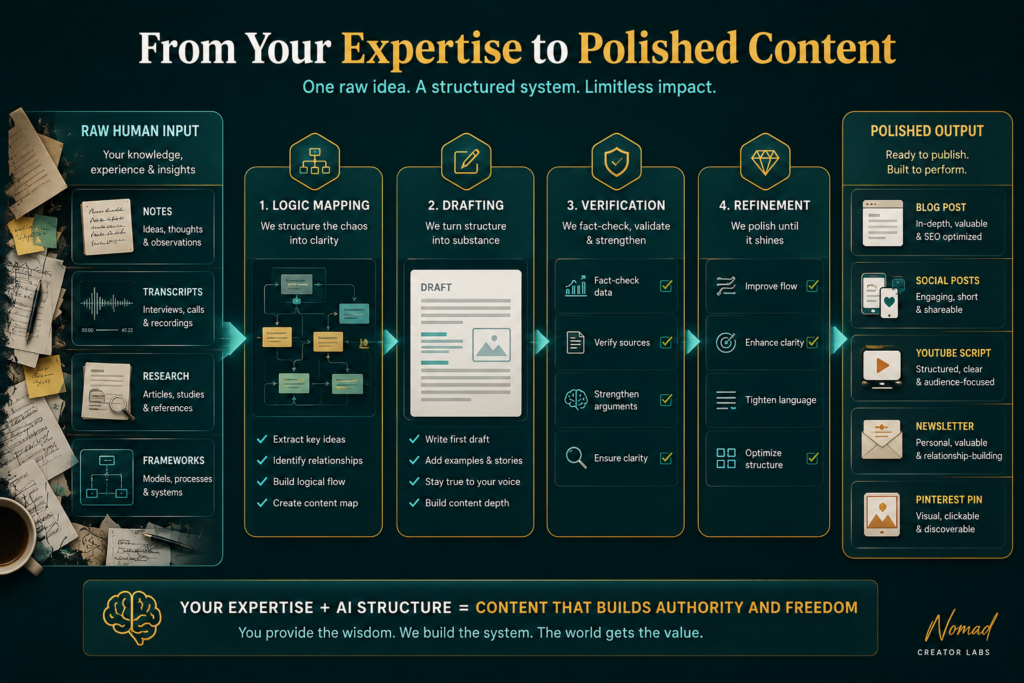
Step 2: Separate Thinking From Writing
This is where a lot of AI workflows go wrong.
People ask the AI model to research, structure, reason, and write simultaneously.
That sounds efficient. In practice, it’s where fabricated logic starts creeping in.
A better approach is to split the workflow into stages.
Stage A: Structure and Logic
Before generating a draft, use the model to map the terrain.
Ask it to:
- identify key claims
- surface assumptions
- outline the argument
- flag areas requiring verification
- identify missing information
At this stage, you’re not asking for polished prose. You’re pressure-testing the thinking.
That changes the interaction completely.
Instead of reviewing a finished article trying to detect hallucinations buried inside paragraphs, you’re reviewing the underlying logic before the writing phase even starts.
That’s much easier to control.
Stage B: Draft From Confirmed Material
Once the structure is solid, the writing phase becomes safer because the model is no longer inventing the facts while drafting.
It’s executing against validated information.
That distinction matters a lot if you want good results.
You’re narrowing the model’s freedom.
And generally, the less speculative freedom the model has, the more reliable the results become.
Stage C: Verification
This is the step most people either rush or skip entirely.
Every factual claim that matters should be verified before publication.
That includes:
- statistics
- dates
- quotes
- research references
- named frameworks
- company details
- legal or technical claims
Importantly, verification should happen outside the AI model.
A surprisingly common mistake is asking AI to confirm whether its own results are accurate – if it wrote it, it’s obviously going to say its true (Duh!)
That doesn’t solve the problem. It often makes things much worse.
Verification means checking against primary sources, trusted documentation, or information you directly control.
If something cannot be confirmed, remove it or rewrite it completely.

Step 3: Understand the Risk Profile of Different Tasks
Not all AI tasks carry the same hallucination risk.
This is one of the most useful distinctions you can build into your workflow.
Some tasks are relatively safe:
- summarizing
- rewriting
- formatting
- reorganizing
- tone adaptation
- extracting themes
Others are inherently higher risk:
- generating statistics
- citing studies
- attributing quotes
- creating technical explanations from scratch
- legal interpretation
- medical advice
- historical claims
The problem is that these different tasks often get blended together in a single prompt.
For example:
“Write me an authoritative article about conversion optimization with supporting statistics and research.”
That prompt combines:
- writing
- research
- citation generation
- factual reasoning
- persuasion
If no source material is provided, the model will often create it’s own information to give you something to work with – whether it’s right or wrong.
Not maliciously. Predictively.
A more stable workflow separates those concerns.
You provide the research.
The AI model helps restructure and communicate it.
That’s a very different approach.
Step 4: Build Verification Into the System Itself
Most people treat verification as a final editing pass.
That’s risky because by the time the draft is finished, fabricated information is already woven into the content.
It’s much harder to detect at that stage, especially when the prose sounds polished.
Verification works better when it’s embedded into the workflow from the start.
One useful technique is running a secondary interrogation pass after each major section.
For example:
“List every claim in this section that would require external verification.”
That forces specificity.
You stop reviewing vaguely and start reviewing concretely.
Now you have an actionable checklist instead of a general feeling that something “might be wrong.”
You can also define permanent verification gates inside your process.
For example:
Always verify:
- percentages
- studies
- named reports
- dates
- attributed quotes
- industry benchmarks
- legal claims
- health claims
No exceptions.
The goal is to make accuracy procedural instead of emotional.
You don’t want to rely on instinct or memory when scaling content production.
You want the workflow itself to catch weak points.

Step 5: Treat Your Expertise as the Core Asset
This is the part most people underestimate.
The AI model doesn’t know your business, your experience, your positioning, or your methods unless you explicitly share the information with it.
And when creators skip that step, the results start sounding strangely generic — even if the writing itself is technically polished.
You see this constantly in AI-generated content online.
The article sounds fluent.
The structure looks clean.
But underneath the prose, there’s no lived experience. No messy business detail. No edge. No real perspective.
That’s usually a sign that the AI model generated the thinking instead of expressing existing thinking.
The best AI workflows reverse that relationship.
The human supplies:
- expertise
- judgment
- positioning
- experience
- frameworks
- examples
- nuance
The model supplies:
- synthesis
- organization
- refinement
- formatting
- adaptation
- acceleration
That division of labor tends to produce much better content.
Especially in niches where credibility matters.
Because readers can usually tell the difference between:
- someone explaining something they’ve actually done
- and someone remixing internet-scraped language patterns
Even if they can’t explain how.
“The models are amazing. They still need a lot of work.” – Andrej Karpathy
Fortune: Karpathy on AI Reliability and Agents
How To Create Your Own Workflow
Here’s a simplified version of how this process can be set up.
Research and Input Phase
Before touching any AI model:
- gather source material
- document your position
- write rough notes
- collect supporting references
- define the audience
- define the angle
At this stage, you’re building the knowledge layer.
Structuring Phase
Use AI to:
- organize ideas
- identify weak logic
- structure the argument
- surface missing pieces
- map content flow
No drafting yet.
Drafting Phase
Now the model can generate prose using researched, validated content.
The draft becomes much easier to trust because the underlying logic already passed review.
Verification Phase
Run interrogation prompts.
Identify:
- unsupported claims
- unverifiable statistics
- fabricated authority signals
- vague assertions needing evidence
Then manually verify everything important.
Final Editing Phase
Only after the accuracy layer is stable should you use the model heavily for:
- tone
- rhythm
- transitions
- readability
- formatting
- flow
Those are comparatively low-risk operations.
At that point, the model is polishing verified content instead of something it invented itself.

The Real Shift
The important question is no longer: “Can AI be trusted?”
A better question is: “Have I designed a workflow where accurate results are always the default?”
Because trust isn’t a property of the tool itself.
It’s a property of the system you use when working with the tool.
When the workflow is structured properly, hallucinations stop being random surprises and start becoming useful signals.
They show you where the process lacks grounding, where information is lacking, or where verification gates need tightening.
That’s the scalable version of AI content creation.
Not blind trust. Not total distrust. But – Operational discipline.
FAQ
Why do AI hallucinations happen?
Because language models optimize for plausibility, not truth.
If the model lacks reliable context, it predicts the most statistically likely continuation of text. Sometimes that prediction is accurate. Sometimes it only sounds accurate.
Without constraints, source material, and verification, fluency and correctness can drift apart very quickly.
Can better prompts solve hallucinations completely?
No.
Better prompts help reduce ambiguity, but prompts alone are not a complete control system.
A strong workflow matters far more than a clever prompt.
Good inputs, structured stages, role separation, and verification gates are what reliably reduce hallucinations over time.
Which AI tasks are safest?
Generally:
- summarization
- restructuring
- rewriting
- extraction
- formatting
- tone adaptation
These tasks work well because the model is transforming existing information instead of fabricating new information.
The more the task depends on generating factual authority from scratch, the higher the verification requirement becomes.
Does this slow content production down?
Initially, slightly.
But over time, structured workflows usually speed things up because they reduce:
- rewrites
- fact correction
- credibility damage
- editing fatigue
- inconsistency across outputs
Most teams lose far more time repairing unreliable output than they would building a proper process upfront.
What if I’m not the expert in the subject?
Then the input layer becomes even more important.
Use:
- primary research
- interviews
- trusted reports
- documented case studies
- internal SMEs
- verified industry data
The workflow stays the same.
You’re still curating expertise before the model touches the material.
The only difference is where the expertise originates.
Ready to Create and Implement?
Download the Hallucination FREE guide. You can flip through it in 5 minutes, follow the prompts and setup your own system. The Guide is Free. You have nothing to lose, go grab it.
Click the button below.